











AI Sentiment Analysis

Sentiment analysis on every channel, under one taxonomy.

Unwrap is an AI customer intelligence platform that reads sentiment across the channels your customers already use and reports it against one taxonomy. Tickets, chat transcripts, reviews, survey responses and call transcripts are labeled after each nightly sync, so a theme carries a single sentiment reading wherever it was raised. Customer experience (CX), support and product teams use it to see which themes are getting worse and for whom. Unwrap is used by teams at Oura, lululemon and Zipcar. What comes out is sentiment per theme, per channel and per account, with the verbatims behind every score.

Book a demo
Retail & Consumer
Travel & Logistics
Software
Compare

See why the top CX, support and product teams use Unwrap

Issue

Consistency
Each tool scores sentiment its own way, so the same complaint gets three readings that never reconcile
Every entry gets a sentiment label under one taxonomy, so a theme reads the same in every channel
Granularity
A single document-level score averages away the part of the message that mattered
Sentiment attaches to the theme inside the message, so one review can be positive on delivery and negative on fit
Model fit
A general-purpose model misreads the vocabulary of your product and your category
Custom natural language processing (NLP) models are fine-tuned for your industry and your customers
Verification
Accuracy is asserted and never demonstrated
Feedback tagging runs at 90%+ precision, independent third parties have verified it in blind accuracy audits, and every score opens onto the text it came from
Coverage
One customer raises the same problem in a ticket, a 2-star review, a Reddit post and a survey answer
Sentiment is read on unprompted feedback too, including reviews, tickets and calls

What is customer sentiment analysis?

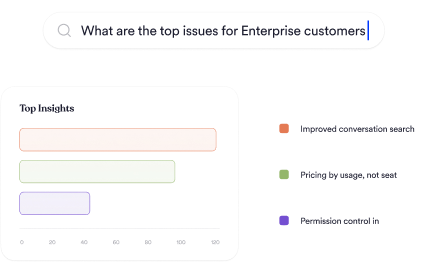
Customer sentiment analysis is the practice of scoring how customers feel about something and attaching that score to the thing they were talking about. The second half does the work. A sentiment number with no theme underneath it tells you the mood and gives you nothing to act on.

Most implementations score a whole document. A review that praises delivery and criticizes sizing becomes one number somewhere in the middle, and both signals are lost. Scoring at the theme level keeps them separate, so a product team can act on the part that concerns it.

How do you compare sentiment across channels that score differently?

Unwrap labels every entry and files it under a single taxonomy, so channel becomes a filter on one reading.

This is the part that usually breaks. A helpdesk has its own tags, a survey tool has its own scale, and a review site has stars, so the same complaint is counted three ways and the totals never agree. Reading every source under one taxonomy lets you say how sentiment on a theme is moving overall.

How is Unwrap’s accuracy verified?

Unwrap runs custom NLP models fine-tuned for your industry and your customers, and feedback tagging runs at 90%+ precision. Independent third parties have verified it in blind accuracy audits.

Traceability is the other half of the answer. Every sentiment score stays linked to the customer text it was drawn from, so any figure on a dashboard can be opened and checked against the verbatims behind it. That is what lets a sentiment number hold up in a meeting where someone disputes it.

Which channels does Unwrap read sentiment on?

Sentiment is scored on tickets from Zendesk, Freshdesk, Gorgias and Kustomer, chat transcripts from Intercom, survey responses from Qualtrics and Medallia, call transcripts from Gong, Zoom and Aircall, and public reviews from Amazon, Trustpilot and Google Maps.

Unprompted channels matter most here. Survey sentiment measures how customers answer when you ask, and support and review sentiment measures what they say when nobody prompts them. Both are read under the same themes, and the full source list sits on the customer feedback integrations page.

What do you do with a theme whose sentiment is falling?

Unwrap sends a Slack or email alert the moment an anomaly is detected in a theme, so a problem reaches you while it is still small.

From there the theme carries its own evidence and its own audience. The verbatims explain the decline, the accounts show who it affects, follow-up runs through close the loop, and the recovery is measured in customer feedback dashboards and reporting. Detection itself is covered on real-time alerts.

Why Unwrap

Because you don’t need another dashboard.

You need answers—before you even think to ask the question.

Proactive insights, zero manual work.

Stop tagging. Stop guessing. Unwrap surfaces customer feedback trends automatically—even the ones you didn’t anticipate.

Trustworthy AI, company wide.

Transparent and accurate insights shared across your entire organization, connecting everyone to the voice of the customer.

Personalized support, from day one.

We don’t just onboard you—we partner with you. Get expert guidance tailored to your business, every step of the way.

How It Works

From unstructured data to structured decisions.

Connect

Integrate feedback from thousands of sources, effortlessly.

Analyse

Messy feedback becomes proactively delivered insights.

Act

Use data to inform roadmaps, prioritize what matters, and make smarter decisions.

Case Studies

Customer-centric teams love Unwrap.

See how Unwrap's insights inspire innovation.

"It’s an understatement to say we’ve ‘saved time’ using Unwrap. Our quantitative visibility into customer feedback was nearly impossible before."

Hayley O.

Senior Manager of User Research at Zipcar

My team loves the Unwrap platform. Unwrap’s insights have enabled us to ultimately gain a deeper understanding of our guests’ needs.

lululemon

Shadi El Baba

VP of Guest Support at lululemon

"Unwrap accelerates our sense-interpret-respond cycles. Every team can have a compressed time from insights to action. Most groups, engineers, analysts want to do better, and now they have fuel for where to focus."

John Moses

VP, Member Experience at Oura

FAQs

Questions? Answers.

Can we see sentiment by account?

Yes, to the extent you send account or segment metadata in. Unwrap exposes that as custom fields, which combine with the sentiment filter.

Do we need to define sentiment categories first?

No. Unwrap builds the taxonomy from your feedback and adds new groups automatically as new patterns appear, and every entry filed under them carries its own sentiment label.

Does this work on unprompted feedback as well as surveys?

Yes. Tickets, chats, reviews, calls and community posts are scored alongside survey responses under the same themes.

Can we compare sentiment between channels?

Yes. Every source lands in the same taxonomy, so channel is a filter rather than a separate score.

How is accuracy verified?

Unwrap uses custom NLP models fine-tuned for your industry and customers. Feedback tagging runs at 90%+ precision, and independent third parties have verified it in blind accuracy audits. Every score stays linked to the text it came from, so any figure can be checked against the source.

Is sentiment scored per message or per theme?

Per theme within the message. A single review can be positive on one theme and negative on another, and both readings are kept.

Discover what matters most.

Book a demo
Book a demo